
1. Home
  2. Beheren van een administratie
  3. Exportfouten doorlopen
  1. Home
  2. Document hub
  3. Exportfouten doorlopen

Exportfouten doorlopen

Published Date: 12-04-2018    Categorie: Beheren van een administratie Document hub
Updated on maart 31, 2021


In dit artikel vind je informatie over:

  1. Waar kan ik Exportfouten controleren?
  2. Hoe los ik exportfouten op?


Exportfouten: Sommige controles die door het boekhoudsysteem worden uitgevoerd, beperken het exporteren van documenten. De documenten blijven steken in Smartbooqing. Er zijn aanvullende acties nodig in de instellingen van het boekhoudsysteem en/of Smartbooqing om de documenten alsnog te kunnen exporteren.


1. Waar kan ik Exportfouten controleren?

Alle bestanden die niet geëxporteerd konden worden worden geparkeerd in het onderdeel “Exportfouten’.


(Inloggen>>selecteer administratie>>Exportfouten)


2. Hoe los ik exportfouten op?

Exportfouten en het oplossen daarvan: In ‘Exportfouten’ vind je alle documenten met exportfouten en de relaties met exportfouten.


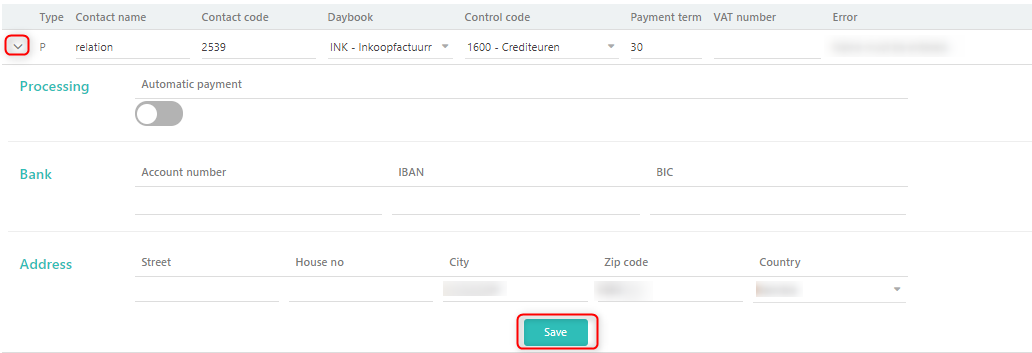
  • Exportfout relaties- Als de relatie een nieuw ontvangen relatie is en de exportfout daarmee samenhangt wordt het in dit onderdeel getoond.


  • Exportfout documenten- Alle documenten met een exportfout verschijnen in dit onderdeel.


Om exportfouten op te lossen zal ons systeem je helpen door korte informatie te geven met betrekking tot deze fouten, zie onderstaand scherm:
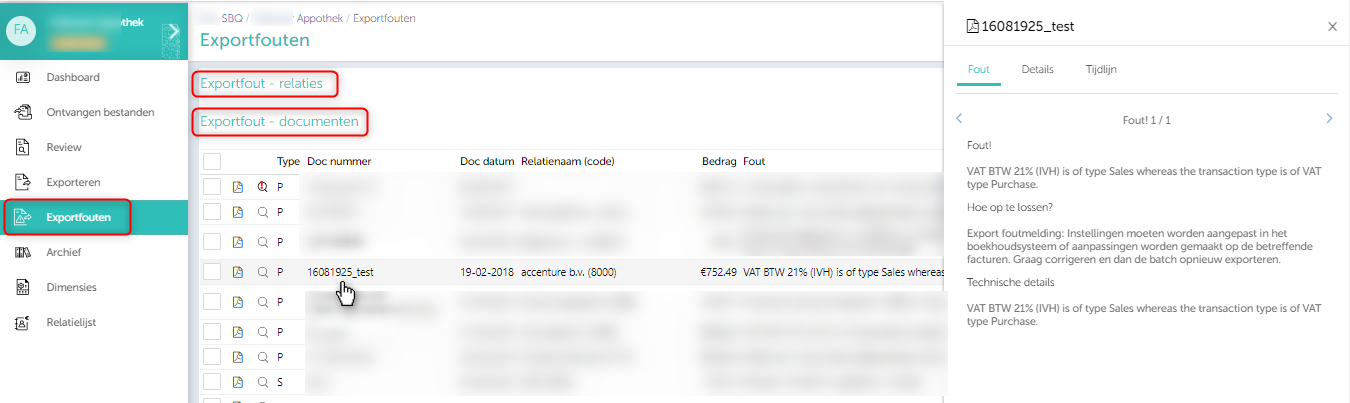
Als je klikt op een factuurregel zal er aan de rechterkant van je scherm een venster openen waarin je kunt nakijken waarom het systeem het document niet kon exporteren naar het boekhoudpakket. De opmerkingen helpen je om de exportfouten te verhelpen.
Updated on maart 31, 2021

Was this article helpful?

Related Articles

Walking through the export errors

Published Date: 13-03-2018    Categorie: Beheren van een administratie Document hub
Updated on augustus 29, 2021


In this article you will find information about:

  1. Where can I check the export errors?
  2. How to resolve the export errors?
  3. Re-exporting the invoices


Export errors: Some system checks applied from accounting system, restricts document to be exported. These documents stopped in Smartbooqing, and need to perform some actions to get them exported, like settings in Accounting systems or in Smartbooqing too.


1. Where can I check the export errors?

All of the files which could not get exported into the accounting system they will be parked into the ‘Export Error’ section. (‘Login’ >> select the administration >> ‘Export errors’)

2. How to resolve the export errors?

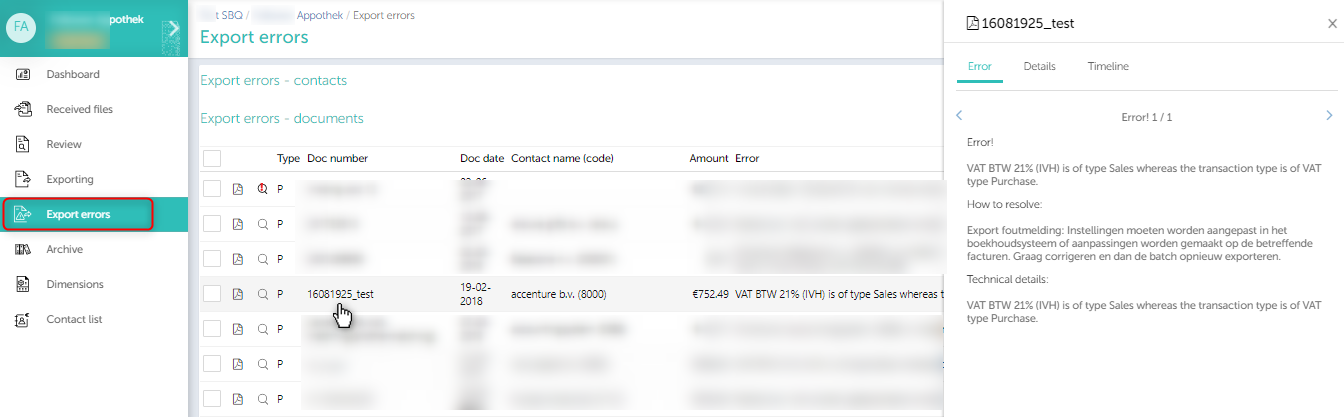
Export errors and resolving them: In this section, you’ll find all of the documents having the export errors and also the contacts having the export errors.


  • Export error contacts– If the contact is newly received contact and having the export error for the same then it will be displayed in this section.


  • Export error documents– All of the documents which are having any kind of export error will be shown up in this section.


Side bar at ‘Export error page’:


To resolve the export errors system can help you out by giving the brief information about these export errors as shown in the below screen.


Clicking on the invoice line in any row you will get a side window where you can check why system could not export the document to the accounting system. These comments will help you out in resolving the export errors.


3. Re-exporting the invoices

  • As you make the necessary changes on the invoice on export error page and now you think they are good to be exported, then you can re-export it with the below steps.
  • Bulk re-export

  • Click on the check box besides the ’type’. It will select all the invoices and click on re-export invoices.
  • To re-export individual invoice, select the invoice and export it.


Updated on augustus 29, 2021

Was this article helpful?

Related Articles