Inbox

Published Date: 13-06-2023    Categorie: SmartPeppol
Updated on december 28, 2023


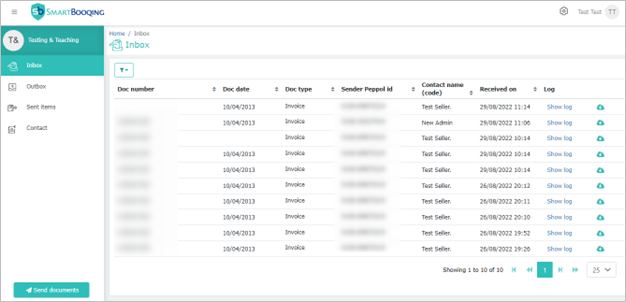
De Inbox pagina toont de UBL documenten die u via PEPPOL en uw PEPPOL ID heeft ontvangen.


De tabel toont kolommen zoals:


Kolomnaam Omschijving
Documentnummer Het documentnummer dat in de UBL staat (Factuurnummer voor een BIS Factuur)
Documentdatum De documentdatum die in de UBL staat (Factuurdatum voor een BIS Factuur)
Documenttype Het soort document (d.w.z. Factuur)
PEPPOL ID van de zender Dit is de PEPPOL ID van uw leverancier
Relatienaam (code) Naam en code van de leverancier. Als u een lijst met contacten bijhoudt checken we of het contact in deze lijst staat
Ontvangen op Een gelokaliseerde datum en tijd wanneer we het hebben ontvangen
Log Door er op te klikken kunt u de tijdlijn van het document zien
Download Door er op te klikken kunt u het UBL document downloaden op uw computer


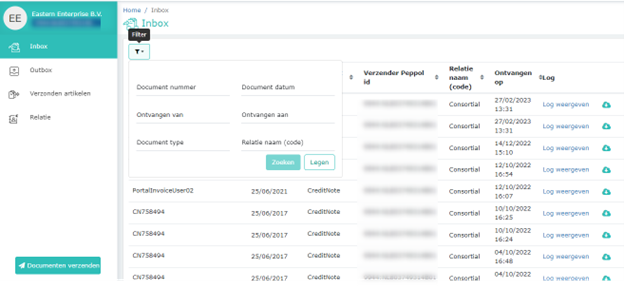
Filteren

U kunt filteren op documentnummer, documentdatum, ontvangen van/tot, documenttype en relatienaam.

Sorteren en naar de volgende pagina

U kunt de kolommen sorteren door op de kolomkop te klikken. Het pijltje geeft de sorteerrichting van oplopend of aflopend aan.


Als de tabel meerdere pagina’s bevat kunt u rechtsonderaan naar de volgende pagina navigeren.
 

Updated on december 28, 2023

Was this article helpful?

Related Articles

Inbox

Published Date: 15-05-2023    Categorie: SmartPeppol
Updated on december 28, 2023


The Inbox page shows the UBL documents you have received through PEPPOL on your PEPPOL ID


The table shows columns in the following way:


Column name Description
Document number The document number mentioned inside UBL (e.g. Invoice No for BIS Invoice)
Document date The document date mentioned inside UBL (e.g. Invoice date for BIS Invoice)
Document type The type of document (e.g. Invoice)
Sender PEPPOL ID The PEPPOL ID of your supplier
Contact name (code) Name and code of the supplier. If you have contact list maintained then we map it with the contact present in Contact list
Received on A localized date and time, we received the document
Log On click, it shows the document logs
Download On click, downloads the UBL document on your computer


Filter

You can filter data in the table by document number, document date, document type, sender PEPPOL ID, contact name, received from and received to.

Sorting & paging

You can sort on the columns by clicking on the column header. Arrow indicates the sort direction ascending or descending.

If the table has multiple pages then you can navigate through the pages using the arrows in the bottom right.


Updated on december 28, 2023

Was this article helpful?

Related Articles